Video · 4 min read
Tarzi AI Video Editor: How It Plans, Edits and Checks Your Video
How the Tarzi AI video editor works on Windows 11: the ask, plan, work and check loop, the Activity panel, the quality check and the fixed-rule policy engine, explained.
The Tarzi AI video editor, Tarzi Editor, is built on a simple promise: you describe the edit in plain words, and the software does the step-by-step work where you can see it. This page looks under the hood at how that works on a Windows 11 PC, without the marketing gloss.
For a general overview, see What is Tarzi Editor?. For the official product page, visit heytarzi.com/products/tarzi-editor.
The core idea: brief it like a person
Most editing software asks you to build the edit: drag clips, split, trim, add text layers, render. Tarzi Editor asks you to brief it, the way you would brief a human editor:
"Cut the pauses and make it thirty seconds for Reels."
The brief can be typed or spoken. You can keep it short or be very specific about length, platform, caption style, titles and music.
The four-step loop
Every edit in the Tarzi AI video editor follows the same loop.
1. Ask
You give the brief. That is the only required input besides the footage.
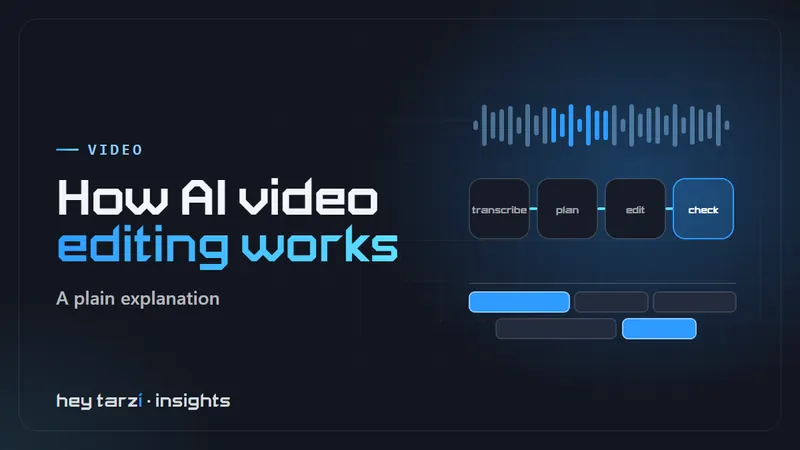
2. Plan
Tarzi Editor reads your footage and lays out the steps before touching anything. You can see what it intends to do before it does it. This matters because a wrong plan is cheaper to fix than a wrong render.
3. Work
Cuts, titles, captions and music happen step by step, in view. Nothing happens off-screen.
4. Check and save
Before you see the result, Tarzi Editor reviews the render against your brief with a built-in quality check. If something did not pass, it tells you plainly instead of hiding it. Then it saves the file.
After that, you watch, ask for changes and export a version for each platform.
The Activity panel: nothing is a black box
A common worry with AI tools is not knowing what they did. Tarzi Editor's Activity panel logs each action as it happens: each cut, caption and title. If a result surprises you, you can see the step that caused it and ask for a specific change.
The quality gate
The quality check is what makes the loop more than "AI makes a guess". Each render is compared with what you asked for. If it does not meet the brief, you hear about it rather than discovering it after you have posted. It is designed to catch mismatches against the brief; your own final watch is still the best check of creative quality.
The policy engine: rules the AI cannot override
Software that acts on your computer should have limits. In Tarzi Editor, every action goes through a policy engine with fixed rules, so the AI never decides on its own what it may do on your computer. The AI proposes and performs edits within those rules; it cannot change them.
Where your files live
According to Tarzi's pricing page, your video files stay on your Windows 11 PC and are edited there.
Captions, titles and style
Captions, title cards and simple motion graphics are generated to match your brand, and every one of them can be adjusted. Putting your fonts and colours in the brief helps keep every video consistent; see best fonts for video titles and colour palettes for Reels.
What the Tarzi AI video editor is good at
- Removing pauses and tightening talking-head footage
- Captioned short clips for Reels and Shorts
- Title cards and simple motion graphics
- Versions for different platforms from the same footage
- Repetitive edits for creators, marketers and agencies
What it is not designed for
Tarzi's own FAQ says it plainly: if you need frame-by-frame control for film work, a traditional editor is still the right tool. Tarzi Editor is aimed at people who would rather describe an edit than build it by hand.
Pricing
Every Tarzi Editor plan includes the whole editor. Plans differ only in AI usage and how you pay. See the pricing page for current details.
- Free trial: 3 videos, every feature, no card needed. Trial exports carry a watermark and run up to 60 seconds.
- Pro: $18 a month, with 20 AI videos a month.
- Studio: $59 a month, with 100 AI videos a month.
- Founder Lifetime: $99 once, a lifetime licence priced in US dollars.
Next steps
See the pricing page for plan details, or join the Tarzi Editor early access list. More guides: How Does an AI Video Editor Work? A Plain Explanation, AI Video Editor for PC, Best AI Video Editors for PC (2026).
Related reading
Frequently asked questions
Is Tarzi a real AI video editor or a template tool?
It edits from a plain-words brief: it plans the steps, performs the cuts, captions and titles, and checks the render against your brief.
Can I see what the AI did?
Yes. The Activity panel logs every action as it happens.
Can the AI do things on my computer without permission?
Every action goes through a policy engine with fixed rules that the AI cannot override.
What happens if the result is wrong?
The quality check tells you plainly if something did not pass. You can ask for changes in plain words.